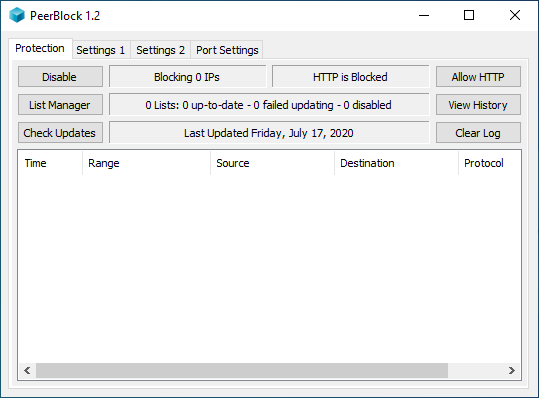
This is our latest Beta Release, released November 21, 2009.
Beta Releases contain newer fixes and features than our Stable Releases, and by definition not necessarily as stable. While we have tested them out internally, until they've been included in Beta Releases for awhile we won't really consider them to have received enough "airtime" to be considered ready for inclusion in a new Stable Release. They are also released much more frequently than Stable Releases, generally once every few weeks (instead of once every few months) - if the frequency of update notices annoys you, install a Stable Release instead!
What's New
Here's what's new since the most recent Beta Release, r202:
- Fixed "PeerBlock doesn't block unless update at startup" - Thanks to a code contribution by one of our users, "wopeg", we now have a fix for this problem. Many thanks wopeg!!
- Enabled "Update at Startup" - We've re-enabled that as an option, so you can now select or deselect that option at will (in the second settings panel). This setting had been hardcoded to True due to the above bug.
- Fixed XP "Only Works on First Start" Problem - This fixes one of the most annoying recent problems, the one in which on some XP systems PeerBlock would fail to load the driver after the first start of a boot.
- Limit Max Size of History.db - In the Settings panel, there will be a new option "History Size", defaulting to 0. Setting this to a non-zero value should cause the history.db to be pruned/archived once it reaches this size.
- Systray "Allow HTTP" instead of "Block HTTP" - In the menu that appears when you right-click on the PeerBlock systray icon, the "Block HTTP" item has been renamed to "Allow HTTP". The thinking behind this is that blocking HTTP should be the default state, with Allow HTTP being the exception. So this should simply make more sense.
- New Splashscreen! - I know, everybody hates the Splashscreens. And no, we're not re-enabling them by default. However, one user (Mourad) sent in a new splashscreen for us that I think is too good to let fall completely by the wayside, so we're including it as our sole splashscreen pic . . . if you choose to manually enable it.
- Changed Error Text - The messages that show up for Exceptions have been changed to not say "This information has been automagically sent to Phoenix Labs, thanks for helping improve PeerGuardian!". Also, changed the "unable to load packet filtering driver" message, to something more meaningful.
- Installer Changes: "Reset PeerBlock settings" should always be deselected - "Reset PeerBlock Settings" should always start deselected even if you'd previously selected it. Same thing with the "Uninstall PG2" task. Archived files are only removed if you tell it to remove PeerBlock settings.
We also changed a bunch of things behind the scenes - code cleanup, additional tracelogging, updated some third-party libraries, etc.
Get it Here
This is the latest PeerBlock Beta, labelled "1.0+" since it's a post-1.0 pre-1.1 release. This is the recommended download for most users.
- PeerBlock 1.0+ (r223) Installer - for Windows 2000, XP, Vista, and 7 (all editions)
If you're new to PeerBlock, you should consider at least skimming through our online User Manual, especially our Frequently Asked Questions page.
Installation
Just download the above .exe file and run it, and it will take care of everything for you!
The above installer will work fine, regardless of whether you're installing on a "fresh" system or upgrading from a previous Beta (or Stable) Release. If you at some point decide to switch to a Stable Release, you can simply run that installer and it will easily downgrade you. Just remember that if you have PeerBlock running on your machine you'll need to stop it in order for the upgrade install to complete - the installer should remind you of this.
Portable Packages
These files contain no installer, and are meant to be used if you want to run PeerBlock from a USB drive, or if you don't want to actually install it. Most users would probably be better off downloading the Installer version above instead of these versions...
PeerBlock "Portable" Packages:
- PeerBlock 1.0+ (r223) for Windows 2000 / XP, 32-bit - .zip file, no installer
- PeerBlock 1.0+ (r223) for Windows XP, 64-bit - .zip file, no installer
- PeerBlock 1.0+ (r223) for Windows Vista / 7, 32-bit - .zip file, no installer
- PeerBlock 1.0+ (r223) for Windows Vista / 7, 64-bit - .zip file, no installer
"Portable" Installation:
If you've downloaded one of these .zip files, you'll need to extract all files from it into some directory on your system, and then double-click peerblock.exe to run it. Note that as these downloads have no installer they will not put anything under Add/Remove Programs, and nothing will show up under the Start Menu for it - you're on your own as far as how/where you want it to show up.
Thanks!
Once again, thanks to you for helping test out the latest and greatest version of PeerBlock. And thanks to all the members of the Dev Team - night_stalker_z, XhmikosR, and DarC - for all the patches they've contributed. And extra special thanks to our "Random Strangers" who've contributed patches and/or graphics: wopeg and Moraud! As always, if you encounter any problems or have any suggestions, please let us know - be it in our forums, our issue tracker, or even via email.
Enjoy!
--- Mark ---